About the Author: Chris Smith

Chris Smith is a UK based SEO consultant and founder of ClickPower, an agency that helps businesses improve visibility, grow organic traffic, and generate reliable leads through search. He specialises in technical SEO, strategic optimisation, website audits, and long term content planning. Based in the Midlands, Chris works with marketing managers and SMEs across the UK, supporting them with clear reporting, transparent communication, and data driven SEO. He is also a SEMrush partner and creates practical SEO content and training for business owners and marketing teams.
You can invite users to become owners or managers of your Google My Business Page. This makes it easier for each individual to have access without sharing login information. Or it could be that someone is carrying out SEO for you, and they require access to the account.
Please note that owners and managers have different access levels to items they can manage.
- Owners can only add or remove users
- Managers can remove themselves
- Google groups cannot be added as managers and owners
- Only the primary owner of the account can transfer ownership.
How to add an Owner or Manager
- Visit your Google My Business Profile.
- Like the screenshot below, it will likely redirect you to the Google Search page.
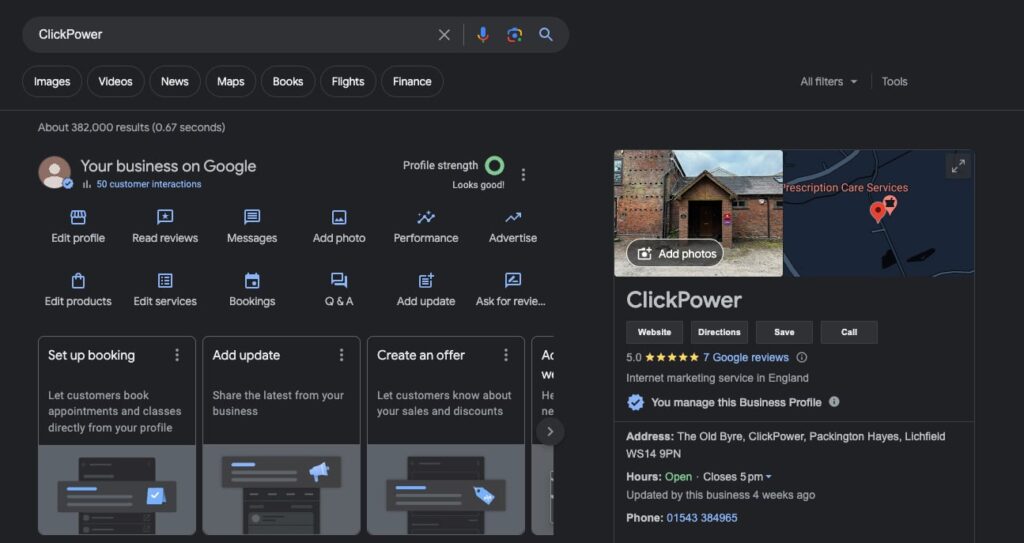
- Click the three dots next to profile strength and select Business Profile Settings.
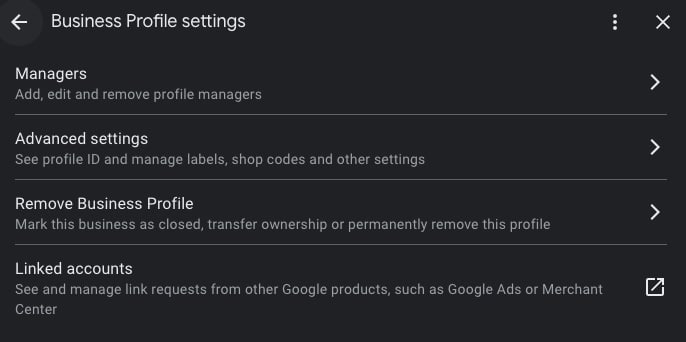
- Now click Managers, and you can assign a manager or an owner using their email address.
I hope you found this useful.